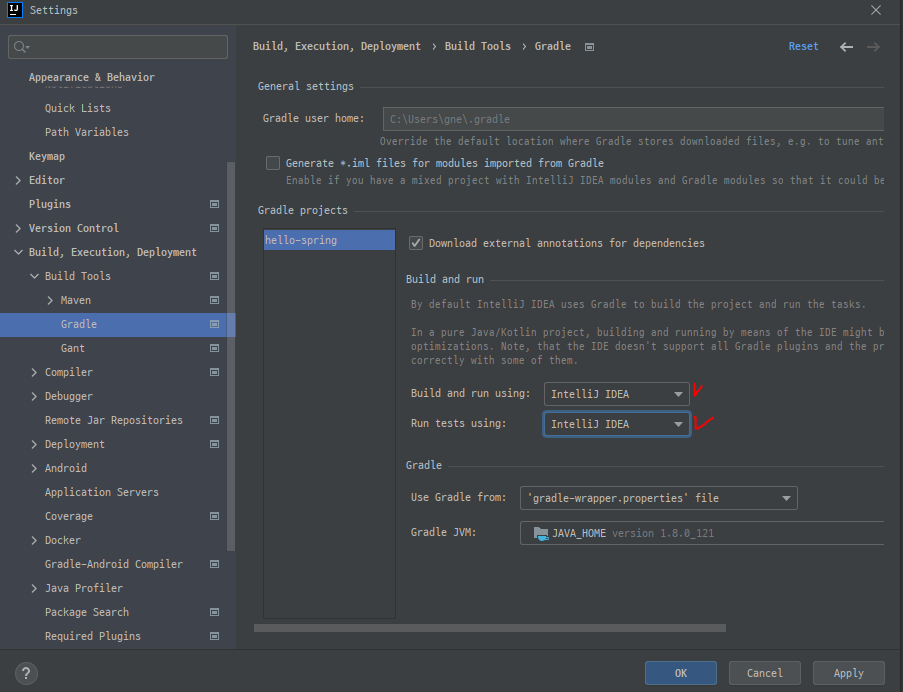
You can use ⌘, (macOS), or Ctrl+Alt+S (Windows/Linux) to display the Preferences/Settings dialog in IntelliJ IDEA.
Build and run 할 때 Gradle 사용하는것보다 InteliJ IDEA를 사용하는게 속도가 더 빠르다.
'개발공부 > 개발하다_발견함' 카테고리의 다른 글
| 수동 Gradle build를 성공하고 싶다 - ERROR: JAVA_HOME is not set and no 'java' command could be found in your PATH. (0) | 2022.02.07 |
|---|---|
| SSL 인증서 갱신 (0) | 2022.01.18 |
| Cause: invalid source release: 11 (0) | 2022.01.12 |
| 아직도 익스플로러를 쓰는 충격적인 기관이 있다?! (2) | 2021.11.30 |
| Missing start tag for "c:forEach" (0) | 2021.10.28 |


댓글